 How-to
7 Remote Sales Productivity Gains from CRM Integrations
Last Updated: October 26, 2026
Quick Summary
CRM integrations remote sales workflows connect your CRM to the tools your team already uses, eliminating manual data entry and lost visibility into customer interactions. Mobile access to integrated CRM data is associated with a 41% increase in revenue per salesperson, while proper CRM integration improves productivity by 26%.
- Automated contact sync, meeting transcription, and form-to-CRM integration eliminate duplicate data entry across systems.
- Email integration logs communications bidirectionally so remote reps access full customer history without switching windows.
- Sales workflow automation routes leads, creates tasks, and sends alerts automatically, preventing missed opportunities across time zones.
- Stagger integration rollouts by pod and measure admin time, CRM completeness, and follow-up adherence to prove ROI honestly.
- Start with native integrations, audit tools and permissions before connecting anything, and monitor sync health weekly after launch.
Table of Contents
- Why Remote Sales Teams Need CRM Integrations
- How CRM Integrations for Sales Teams Eliminate Manual Data Entry
- Setting Up CRM Email Integration to Sync Communications
- Automating Your Sales Workflow With CRM Integration
- Implementing CRM Data Synchronization Across Your Tools
- Measuring Productivity Gains and ROI From Your Integrations
- Starting Your CRM Integration Rollout With Your Remote Team
- Phase 0: Audit your tools and data before you connect anything
- Phase 1: Design permissions and data governance up front
- Phase 2: Choose the connection method deliberately
- Phase 3: Pilot with power users and a defined test plan
- Phase 4: Expand with async-first training
- Phase 5: Monitor reliability and data quality after launch
- Frequently Asked Questions
Why Remote Sales Teams Need CRM Integrations
Remote sales teams lack the office infrastructure that traditionally kept operations running. Learn how to build the broader IT infrastructure needed to support CRM integrations and remote work.
The stakes are real. According to LinkPoint360's 2026 CRM statistics, CRM systems can increase sales by up to 29%, but only when they're properly integrated into your workflow.
The real problem isn't the CRM, it's the gaps between your CRM and everything else your team touches: email, calendar, communication platforms, accounting, and time tracking.
How CRM Integrations for Sales Teams Eliminate Manual Data Entry
Manual data entry is the silent killer of remote sales productivity. Your team spends time typing information into multiple systems instead of talking to prospects. According to SuperOffice's 2026 productivity research, proper CRM integration improves productivity by 26%, largely by cutting administrative overhead.
Here's how integrations solve this:
- Automated contact sync: When a prospect replies to an email, their contact details automatically populate your CRM without manual entry
- Meeting transcription integration: Call recordings and transcripts flow directly into the customer record with next steps logged automatically
- Form-to-CRM sync: Web form submissions bypass manual data entry and land directly in your pipeline
The result: your team spends less time on administrative tasks and more time on revenue-generating activities. According to SellersCommerce's 2026 ROI analysis, businesses using CRMs see an average ROI of $8.71 for every dollar spent, much of that driven by time savings from automation.
Setting Up CRM Email Integration to Sync Communications
Email is where most sales conversations happen, yet email and CRM often operate as separate silos. Email integration automatically logs emails, attachments, and follow-up tasks into your CRM.
Remote reps need full communication history without switching windows. Configure:
- Two-way sync: Emails sent from your CRM automatically appear in your team member's inbox; replies sync back to the customer record
- Attachment storage: Proposals, contracts, and documents stay linked to the customer profile, not buried in email folders
- Read receipts and tracking: Know when prospects open your emails and how long they spend reviewing materials
Setup depends on your provider: Outlook typically uses native connectors, while Gmail may require third-party middleware. Test with a small group of reps first, adoption is faster when the team sees immediate value.
Automating Your Sales Workflow With CRM Integration
Sales workflow automation transforms how your remote team moves deals through the pipeline, handling routine work like updating stages, assigning tasks, and sending follow-ups.
Key automation opportunities for remote teams:
- Lead routing: Incoming leads automatically assign to the right rep based on territory, skill, or availability
- Task creation: When a deal reaches a specific stage, tasks auto-generate for the next action (send proposal, schedule call, request approval)
- Notification alerts: Team members get real-time notifications about deal changes, preventing missed opportunities
This creates accountability and visibility without constant check-ins: managers see who's behind on follow-ups, reps know what comes next, and nothing falls through the cracks.
Implementing CRM Data Synchronization Across Your Tools
Your CRM shouldn't be an island. Data lives in accounting, inventory, support tickets, and time tracking tools. CRM data synchronization connects these systems so information flows bidirectionally without manual intervention.
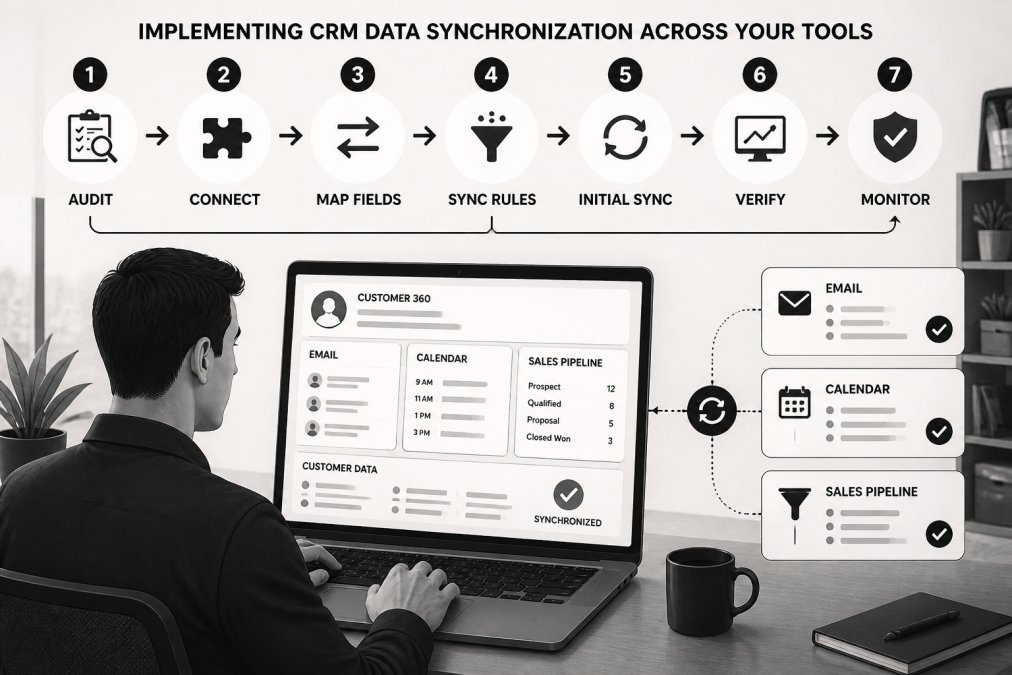
Start by mapping your critical data flows:
- Customer data: Contact details, company info, and communication preferences sync from your CRM to accounting and support systems
- Order data: When deals close, order information automatically pushes to fulfillment and accounting
- Support tickets: Customer service interactions log back to the CRM, giving sales visibility into post-sale issues
For remote teams, this unified data model prevents the "which system has the right version?" problem, everyone sees the same customer picture. You can integrate managed services with your tech stack.
Measuring Productivity Gains and ROI From Your Integrations
Most integration advice stops at "track your metrics." That's not enough for a distributed team: a rep who looks busy in chat may be losing hours to duplicate data entry, while a quiet rep may be closing deals asynchronously. To prove integration ROI, you need a baseline, remote-relevant metrics, and a way to separate integration effects from everything else.
Step 1: Capture a two-week baseline before you connect anything
Pull these numbers from your current systems, not memory. Two weeks smooths out a slow Monday while keeping data current.
- Admin time per rep per week, have reps self-log time in 15-minute blocks for five business days, then extrapolate.
- CRM record completeness, sample 50 open opportunities and count how many have a logged next step, a decision-maker contact, and recent activity.
- Speed to first response, median time from inbound lead to first human touch, measured in your CRM or inbox.
Record these in a shared sheet with date and data source. If you can't measure a metric cleanly today, note it, that usually means the integration will help.
Step 2: Choose metrics that reflect remote work, not office presence
Activity counts (calls, emails) are weak proxies across time zones. Favor outcome and hygiene metrics that don't depend on someone being online at 9 a.m.:
- Time-to-first-touch on inbound leads, segmented by source.
- Follow-up adherence, percentage of deals where the next step was completed within the agreed window.
- CRM completeness score, a weighted score across required fields, next step, and recent activity.
Step 3: Attribute gains honestly
Integrations rarely act alone. If you also changed comp, territory, or messaging that quarter, you can't credit the integration for the full lift. A practical approach:
- Stagger the rollout. Enable email and calendar sync for one pod first, keep a comparable pod on the old workflow for 30-45 days, and compare the same metrics. Not a perfect experiment, but far better than a before/after story with no control.
- Tag the change. Note the go-live date on your dashboard to see whether the metric moved at that point or drifted earlier.
- Look for mechanism, not just movement. If admin time fell but CRM completeness also fell, reps may be skipping logging rather than saving time.
Step 4: Build a simple ROI model
Use your own numbers, not industry averages. A defensible model has three inputs:
- Hours saved per rep per week (baseline admin time minus post-integration admin time).
- Loaded hourly cost per rep (salary plus benefits plus tools, divided by productive hours).
- Incremental pipeline or win-rate effect, only if visible in the staggered comparison.
Subtract real costs: subscription fees, implementation time, and ongoing admin. Often the hours-saved line alone justifies the spend within a quarter or two, while the revenue line is upside validated over a longer window. Present both separately so leadership sees which claim is proven and which is projected.
Step 5: Report to the team, not just to leadership
Remote teams adopt integrations faster when they see the payoff in their own day. Share a short monthly note: hours saved, follow-ups completed on time, and one concrete example of a deal that moved because the data was in one place. That feedback loop keeps adoption from slipping after launch excitement fades.
Track these metrics before and after integration to measure the real impact on your remote team.
| Metric | Purpose | Measurement |
|---|---|---|
| Admin time per rep per week | Baseline for time savings | Self-log in 15-minute blocks for five business days |
| CRM record completeness | Data quality baseline | Sample 50 opportunities for next step, decision-maker, recent activity |
| Speed to first response | Lead responsiveness | Median time from inbound lead to first human touch |
| Duplicate and orphan records | Data hygiene | Count contacts with no owner and companies with multiple active records |
| Pipeline hygiene | Deal quality | Percentage of deals with past close date or no activity in 14 days |
| Forecast accuracy | CRM reliability | Compare committed forecast to actual closed revenue |
| Follow-up adherence | Execution consistency | Percentage of deals where next step completed within agreed window |
Starting Your CRM Integration Rollout With Your Remote Team
A phased timeline is necessary but not sufficient. Remote rollouts fail operationally: nobody audited which tools are actually in use, fields don't line up, permissions expose records, and sync conflicts go unnoticed until a rep loses a deal. The sequence below adds those steps to the usual pilot-and-expand plan.
Phase 0: Audit your tools and data before you connect anything
You can't integrate what you haven't inventoried. Spend a week here.
- Tool inventory. List every system a rep touches in a week: email, calendar, dialer, meeting recorder, proposal tool, chat, support desk, accounting, e-signature, time tracking. Note the owner, cost, and whether it holds customer data.
- Usage reality check. Pull login data for the last 30 days. Low-usage tools are candidates to retire rather than integrate, every connection you skip is maintenance you avoid.
- Field mapping. For each system you'll connect, write down which field maps to which CRM field and decide the system of record (e.g., CRM owns account name; support desk owns ticket status). Ambiguity here is the root of most sync conflicts.
Phase 1: Design permissions and data governance up front
Remote teams access systems from personal networks and devices, so access design isn't optional.
- Role-based access. Map roles (SDR, AE, manager, ops) to record visibility before enabling sync. A calendar integration exposing executive calendars to the whole team is a governance failure, not a feature.
- Field-level controls. Decide which synced fields are editable in which system. If both sides can edit owner or stage, you'll get conflicts.
- Consent and retention. Confirm how customer data is collected, stored, and retained. If you handle regulated data, involve compliance before the pilot, not after.
Phase 2: Choose the connection method deliberately
Not every integration should be built the same way.
- Native integration, best when the vendor ships and maintains it, the data direction is simple, and you want low maintenance. Watch for limited field mapping.
- Direct API, best when you need custom logic or a system native connectors do not cover. Requires engineering ownership and monitoring.
- Middleware or iPaaS, best when you are connecting several systems, need transformation logic, or want one place to monitor failures. Adds cost and a dependency, but centralizes reliability.
A practical rule: start native, move to middleware when you exceed two or three custom connections or when sync failures become hard to trace.
Phase 3: Pilot with power users and a defined test plan
Pick two or three tech-comfortable reps and run a scripted test, not a vibe check.
- Create a test contact, send an email, book a meeting, submit a form, and confirm each action lands in the CRM with the right owner and fields.
- Deliberately create a conflict (edit the same record in both systems) and confirm the resolution rule behaves as designed.
- Log every issue with a screenshot and timestamp so the vendor or IT can reproduce it.
Phase 4: Expand with async-first training
- Record short walkthroughs (under five minutes each) and keep a written FAQ. Remote reps learn at different hours; live-only training loses people.
- Assign an integration champion per time zone so questions don't queue overnight.
- Publish field-mapping and ownership rules so reps know which system to trust.
Phase 5: Monitor reliability and data quality after launch
This is where most rollouts quietly degrade.
- Sync health dashboard. Track failed syncs, sync lag, and error rates weekly. Set alerts for spikes.
- Duplicate and orphan reports. Review weekly for the first month, then monthly.
- Ownership rules. Every synced record needs an owner; unowned records are where follow-ups die.
For teams without in-house integration expertise, it is worth evaluating managed IT service providers.
Frequently Asked Questions
How can CRM integrations improve remote sales productivity?
CRM integrations connect sales tools so data can flow between systems. Whether they improve productivity depends on the tools and how they are configured.
Which CRM integrations are most useful for remote sales teams?
CRM integrations for remote sales teams can include email and calendar synchronization, communication platforms, accounting software, and call logging tools. Which integrations are useful depends on the team's systems and needs.
How do you reduce manual data entry with CRM integrations?
CRM integrations can be configured to transfer data between systems. The available functions depend on the systems and integration.
What should we measure to track CRM integration ROI?
Track time spent on administrative tasks, duplicate customer records, data accuracy, sales cycle length, revenue per salesperson, response time to customer inquiries, and team alignment on customer status. Use your own baseline and results to assess whether an integration is meeting your goals.