 ultimate-guide
Managed IT Helpdesk Response Times: What Matters
Table of Contents
- What Defines Helpdesk Response Times
- IT Support SLA Examples and What They Mean
- Average Helpdesk Response Time Metrics by Industry
- IT Support Ticket Priority Levels and Triage
- Factors That Influence Your Response Times
- Why Speed Matters: The Business Impact of Slow Response
- How to Hold Your MSP Accountable
- Conclusion
Last Updated: August 12, 2026
What Defines Helpdesk Response Times
Helpdesk response times refer to the interval between when a user submits a support ticket and when your IT team acknowledges or begins addressing the issue. This metric is foundational to service quality, but it's often misunderstood. Many organizations conflate response time with resolution time, treating them as interchangeable when they're fundamentally different measures.
Response time is about acknowledgment and initial action. It signals to the user that their issue has been received and someone is working on it. A fast response time, typically measured in minutes to a few hours, prevents anxiety and demonstrates that support is active. However, a quick response doesn't guarantee a quick fix. You could acknowledge a ticket in 15 minutes and still take three days to resolve it.
Response vs. Resolution: The Critical Distinction
Response time is the moment your team acknowledges the ticket. Resolution time is when the issue is actually fixed and the user can return to normal operations.
Consider a critical server outage. Your team might respond within 5 minutes, acknowledging the problem and beginning diagnosis. But resolution might take 4 hours if the fix requires patching, testing, and deployment. Both metrics matter, but they measure different things. A fast response without reasonable resolution creates frustration.
Many SLAs focus heavily on response metrics because they're easier to control. Your team can be trained to acknowledge tickets quickly. Actual resolution depends on problem complexity, available resources, and sometimes factors outside your control. This is why mature helpdesk operations track both metrics separately and understand the relationship between them.
VegaMSP's approach to helpdesk management emphasizes this distinction, ensuring that unlimited helpdesk support means both rapid acknowledgment and committed resolution timelines based on priority level.
IT Support SLA Examples and What They Mean
A Service Level Agreement (SLA) is a contract between your IT provider and your organization that defines response and resolution commitments. SLAs are binding and establish what "good" looks like and what happens if targets are missed.
Most SLAs are tiered by priority level. A Priority 1 critical outage has much tighter response and resolution windows than a Priority 3 minor inconvenience. A user submits a ticket, it's automatically classified by severity, and your SLA clock starts immediately. Your team must respond within the promised window and ideally resolve within a second, longer window.
Effective SLAs also define what counts as a "response." Some agreements require only acknowledgment. Others require initial diagnosis. These definitions matter because they determine whether you're actually meeting user needs or just hitting technical targets.
Priority 1 Critical Issues
Priority 1 tickets represent system outages or critical failures that prevent users from working. A downed email server, a network outage affecting the entire office, or a security breach all qualify. For Priority 1 issues, response time is typically 15 to 30 minutes, and resolution should be targeted within 2 to 4 hours.
Every minute of downtime compounds. Users can't work, productivity stops, and revenue may be at risk. SLAs for Priority 1 often include escalation procedures, on-call coverage, and dedicated resources. Many providers commit to 24/7 availability for these incidents because waiting until business hours isn't acceptable.
Priority 2 and 3 Tickets
Priority 2 issues affect a user or small group but don't halt operations entirely. A single user's printer not working, a software license issue, or performance degradation falls here. Response time for Priority 2 is typically 1 to 4 hours, with resolution targeted within 8 to 24 hours.
Priority 3 represents minor issues, requests, or questions. A password reset, software installation, or general guidance. Response time for Priority 3 might be 4 to 8 hours, with resolution in 1 to 3 business days. As priority decreases, your team has more flexibility in resource allocation.
Average Helpdesk Response Time Metrics by Industry
Response time expectations vary significantly by industry. Financial services and healthcare operate under stricter regulatory requirements and have less tolerance for downtime. Technology companies often have more sophisticated internal IT teams but higher user expectations for support speed.
Organizations in highly regulated sectors typically commit to faster response times because the cost of downtime is higher and compliance risk is real. A healthcare provider's patient management system going down is a potential patient safety issue. A financial institution's trading system failing creates regulatory exposure.
What matters is matching your SLA to your actual business needs, not industry averages. Document your dependencies, rank them by impact, and negotiate SLAs that reflect reality.
IT Support Ticket Priority Levels and Triage
Ticket triage is the process of classifying incoming support requests by urgency and impact. This classification determines which SLA applies and how quickly your team responds. Without clear triage rules, your helpdesk becomes reactive chaos.
Most organizations use a four-level priority system: Critical (Priority 1), High (Priority 2), Medium (Priority 3), and Low (Priority 4). The definition of each level should be specific to your business. A "critical" issue for a software company might be "any bug affecting production code." For a consulting firm, it might be "any issue preventing client delivery."
Triage should be partly automated and partly manual. Automated rules catch obvious patterns; a ticket mentioning "server down" gets flagged as Priority 1 automatically. Manual review catches edge cases where impact isn't obvious. Clear triage rules prevent over-prioritizing minor issues and under-prioritizing real problems.

Factors That Influence Your Response Times
Several factors determine whether your team can actually hit response time targets.
Staffing and expertise. A team of five people handling 200 tickets per day will miss response targets regardless of efficiency. Staffing should match ticket volume and complexity.
Ticket volume and distribution. If all critical issues arrive at 9 AM, your team will miss response targets even if well-staffed overall. 24/7 support helps spread the load across shifts.
Automation and tooling. Helpdesk software that auto-categorizes tickets, assigns them intelligently, and routes escalations saves time. Workflow automation reduces resolution time and frees capacity for complex issues.
Knowledge and documentation. A well-maintained knowledge base and documented procedures let technicians answer questions faster. First-call resolution improves dramatically when your team doesn't have to hunt for information.
Integration with your infrastructure. If your helpdesk tool doesn't integrate with your monitoring systems, your team won't know about outages until users report them. Integrated monitoring that automatically creates tickets for critical events reduces response time.
Remote monitoring and management. Tools that let your team see into user systems, restart services remotely, and diagnose problems without asking users for screenshots dramatically improve response speed.
Why Speed Matters: The Business Impact of Slow Response
Slow helpdesk response creates cascading costs that go far beyond immediate frustration.
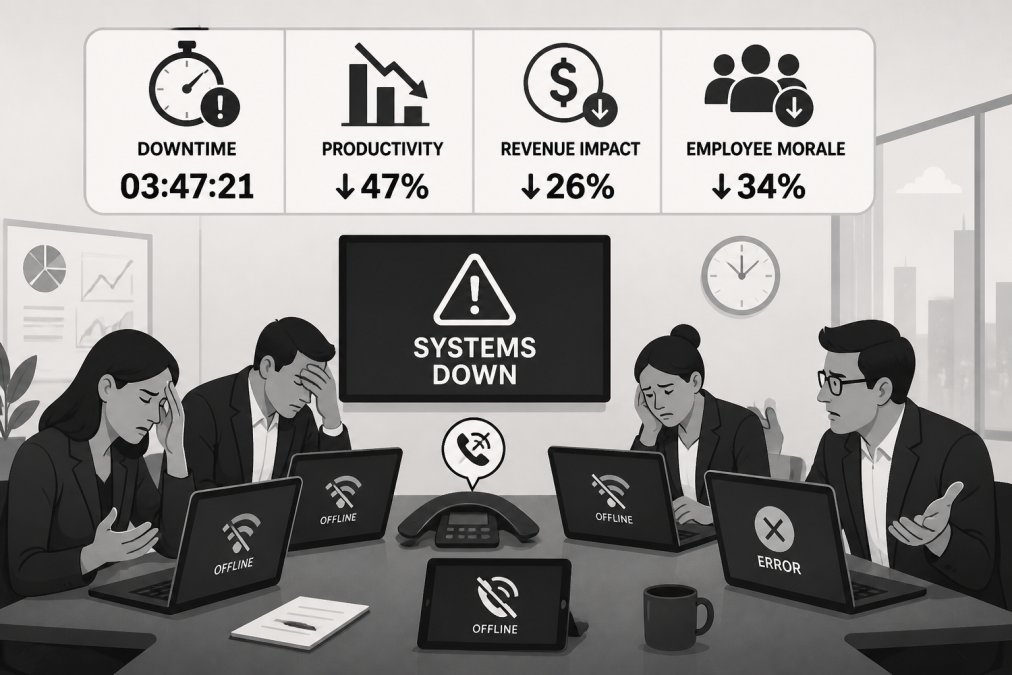
Every minute of downtime costs money. If your organization has 50 users and each generates $100 per hour in productivity value, a 1-hour outage costs $5,000. A 4-hour incident (2 hours response, 2 hours resolution) costs $20,000.
Slow response times also damage user trust in IT. When users can't rely on support, they work around problems, using personal devices or storing data locally instead of in secure systems. These workarounds create security risks and reduce infrastructure effectiveness.
Slow response affects employee retention and satisfaction. Users who regularly wait hours for basic support become frustrated. IT becomes seen as a bottleneck rather than an enabler.
For customer-facing organizations, slow internal IT response directly impacts customer experience. If your support team can't access customer data because your CRM is down, your customers see the impact.
How to Hold Your MSP Accountable
If you're working with a managed service provider, your SLA is your primary accountability tool. But SLAs are only useful if you actually monitor them and enforce them.
Start by getting SLAs in writing with specific, measurable targets. "Fast response" is meaningless. "Response within 30 minutes for Priority 1 issues" is measurable. Include definitions of each priority level and what counts as a "response."
Track your provider's actual performance against SLAs monthly. Are they consistently hitting targets? If not, why? Don't accept "we're close."
Include escalation procedures in your SLA. What happens if response time targets are missed? Some agreements offer service credits. Others require root cause analysis and corrective action plans.
Ask your provider about backup and redundancy plans. How do they maintain response times during staff absences or unexpected spikes in ticket volume? A provider without redundancy will miss SLAs when they're most needed.
Request regular business reviews where you discuss trends, problem areas, and improvements. A good MSP will proactively identify patterns and propose solutions.
VegaMSP's unlimited helpdesk support model includes accountability mechanisms that prevent the common trap where "unlimited" becomes "unresponsive." Clear SLAs, regular reporting, and dedicated resources ensure that response times remain consistent regardless of ticket volume.
Slow helpdesk response times create hidden costs that multiply across your organization. When your IT support takes hours to acknowledge issues, your team loses productivity, security risks increase, and user frustration builds. VegaMSP's fully managed approach eliminates the guesswork by providing unlimited helpdesk support with defined response commitments, integrated monitoring that catches problems before they become outages, and the technical depth to actually resolve issues quickly rather than just acknowledge them.
Frequently Asked Questions
What is the difference between response time and resolution time in an SLA?
Response time is when your help desk acknowledges the ticket, usually within 15 minutes to 4 hours depending on priority. Resolution time is when the issue is actually fixed. A Critical Priority 1 ticket might need acknowledgment within 15 minutes but resolution within 4 hours. Many organizations confuse these, thinking fast response means the problem is solved. They're not the same. Response time measures your team's speed at getting to work; resolution time measures how fast the work gets done. Both matter, but resolution time directly affects your business.
What is the industry standard for IT helpdesk response times?
Most managed service providers aim for 15-30 minute response times on Critical Priority 1 issues, 1-2 hours on Priority 2 (High), and 4-8 hours on Priority 3 (Medium). Standard business hours support typically responds faster than after-hours. However, 'industry standard' varies by sector, financial services and healthcare demand faster response because downtime costs more. The real benchmark is your business impact: if one hour of downtime costs you $5,000, your SLA should reflect that urgency. Ask your MSP what their actual average response time is, not just their target.
How do managed service providers prioritize support tickets?
MSPs use ticket triage to assign priority based on business impact, not arrival order. A Critical Priority 1 ticket stops business operations, like a server down or total network loss. Priority 2 (High) affects multiple users or core functions but has workarounds. Priority 3 (Medium) affects individual users or non-critical systems. Priority 4 (Low) is feature requests or documentation. The best MSPs let you define priorities based on your actual business model. Some use automated rules: if a ticket mentions 'all users can't access email,' it auto-escalates to Priority 1. Others require manual assessment. Automation speeds triage, but human judgment prevents false alarms.
Why does my MSP's response time matter if resolution takes days?
Fast response time buys you two things: acknowledgment that someone is working on it, and early diagnosis that might lead to faster resolution. A 15-minute response on a Critical issue means a technician starts investigating immediately, they might identify the root cause and resolve it in the next 30 minutes, or determine it needs escalation to a specialist. Slow response (2-4 hours) means the problem compounds: more users are affected, workarounds fail, and the technician starts troubleshooting when the issue is more complex. Response time is your first line of defense against cascading failure. It also shows your MSP has adequate staffing and monitoring to catch problems fast.
This article was written using GrandRanker