 how-to
How to Reduce IT Downtime for Small Business
Table of Contents
- The True Cost of IT Downtime for Small Business
- Step 1: Implement Proactive Monitoring and Maintenance
- Step 2: Build a Disaster Recovery Plan Template
- Step 3: Prioritize Software Patching and Updates
- Step 4: Invest in Reliable Infrastructure and Redundancy
- Managed IT Services Benefits for Downtime Prevention
- Calculate Your Cost of IT Downtime
- Remote Work and SaaS-Specific Downtime Challenges
Last Updated: August 13, 2026
The True Cost of IT Downtime for Small Business
IT downtime is a direct hit to your bottom line. When systems go down, every minute costs money through lost productivity, missed customer interactions, and potential data loss. For small businesses with lean teams, even a few hours of downtime can derail an entire day's work and damage client trust.
Many small business owners don't quantify this cost until it's too late. A server failure, ransomware attack, or failed software update can cascade across your entire operation. When you know exactly what downtime costs your business, you can justify investments in prevention, seeing managed IT services or infrastructure upgrades as insurance against far larger losses. At VegaMSP, we work with small business owners to identify these hidden costs so they can make informed decisions about their IT strategy.
The cost extends beyond immediate revenue loss to include customer service disruptions, employee frustration, compliance violations, and reputational damage. Each industry faces unique consequences, but the financial impact is always severe.
Step 1: Implement Proactive Monitoring and Maintenance
Proactive monitoring and maintenance is the foundation of reducing IT downtime. Instead of waiting for problems to occur, you actively watch your systems and fix issues before they cause outages. This shifts your IT strategy from reactive firefighting to preventive care.

Set up real-time alerts
Real-time alerts notify you the moment something goes wrong. Configure monitoring tools to track critical metrics like server CPU usage, disk space, network bandwidth, and application response times. Set different alert severity levels: a disk at 70% capacity warrants a warning, while 95% demands immediate action.
Most small businesses should monitor file servers, email systems, internet connectivity, backup systems, and customer-facing applications. Real-time alerts give you the window to respond before users are affected.
Schedule preventive maintenance windows
Schedule preventive maintenance during low-traffic periods, early mornings, late evenings, or weekends. Create a maintenance calendar and document weekly tasks (backup verification, log reviews), monthly tasks (security patch testing, performance audits), and quarterly tasks (hardware inspections, capacity planning).
Preventive maintenance prevents the majority of downtime incidents. A patched system is far less likely to be exploited by malware. A server with adequate disk space won't crash from a full drive. These routine tasks take a few hours per month but prevent costly outages.
Step 2: Build a Disaster Recovery Plan Template
A disaster recovery plan documents which systems matter most, how quickly you need to recover them, and the specific steps to restore operations. Without a plan, your team wastes time deciding what to do while your business loses money.
Define recovery time objectives (RTO) and recovery point objectives (RPO)
Recovery Time Objective (RTO) is the maximum time you can tolerate a system being down. Recovery Point Objective (RPO) is the maximum amount of data you can afford to lose.
These metrics vary by system. Your email server might have an RTO of 4 hours. Your customer database might have an RTO of 1 hour because you can't operate without it. Your financial system might have an RTO of 30 minutes because delayed transactions create compliance issues.
RPO determines your backup frequency. If your RPO is 1 hour, you need hourly backups. If your RPO is 4 hours, daily backups might suffice. Document your RTO and RPO for each critical system, this is a business decision based on the cost of downtime versus the cost of recovery infrastructure.
Document critical systems and dependencies
Create an inventory of your critical systems and map their dependencies. Your email system depends on your domain controller. Your accounting software depends on your file server and database. Understanding these dependencies prevents you from recovering System A only to discover it can't function without System B.
Document each system's location, backup schedule, recovery procedure, and owner. Include vendor contact information and license details. Identify single points of failure and address them through redundancy or documented procedures that others can follow.
Create incident response communication templates
When downtime occurs, your team needs to know what to communicate and to whom. Create templates for different scenarios: email server down, website unavailable, data breach suspected, ransomware attack detected.
Each template should include who needs notification, what message to send, how quickly to send it, and who approves it. Pre-written templates ensure you communicate quickly and consistently during stressful situations.
Step 3: Prioritize Software Patching and Updates
Software patches fix security vulnerabilities and bugs that cause system failures. Unpatched systems are vulnerable to cyberattacks that lead to downtime. Establish a patch management process: test patches in a non-production environment first, schedule deployment during maintenance windows, and prioritize security patches over feature updates.
Most organizations should patch monthly, with critical security patches deployed within days of release. Automate patching where possible, many systems allow automatic updates during off-hours. This removes manual burden and ensures patches are applied consistently.
Step 4: Invest in Reliable Infrastructure and Redundancy
Reliable infrastructure is built to tolerate failures. When you invest in redundancy, a single component failure doesn't take down your entire operation.
Implement automated backups and data loss prevention
Automated backups ensure you never lose critical data. Configure backups to run automatically at regular intervals, daily for most businesses, more frequently for systems with low RPO requirements. Store backups both locally for fast recovery and offsite for protection against physical disasters.
Test your backups regularly. A backup that can't be restored is worthless. Schedule quarterly restore tests to verify your backups work and document the restore procedure.
Data loss prevention includes access controls that prevent accidental deletion, version history that lets you recover previous file versions, and encryption that protects data if hardware is stolen.
Strengthen network security and cybersecurity threats mitigation
Cybersecurity threats cause downtime through ransomware, malware, and distributed denial-of-service attacks. Strengthen your defenses through firewalls, endpoint security, email filtering, and user training.
Endpoint security software protects individual computers and servers from malware. Email filtering blocks malicious attachments and phishing attempts. Multi-factor authentication prevents unauthorized access even if an attacker obtains a password.
Regular security audits identify vulnerabilities before attackers exploit them. Penetration testing simulates attacks to find weaknesses. These assessments cost far less than recovering from a security breach.
Managed IT Services Benefits for Downtime Prevention
Managed IT services provide expertise and resources that many small businesses lack internally. A managed service provider monitors your systems 24/7, patches software proactively, manages your infrastructure, and responds to incidents before they become major outages.
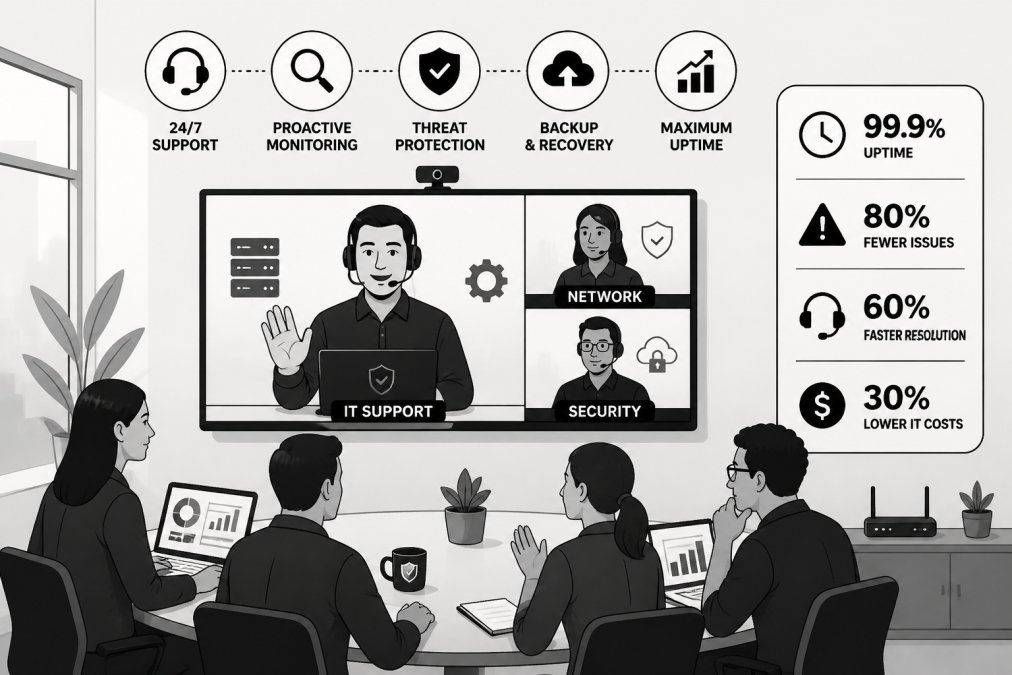
The primary benefit is continuous monitoring. Your systems are watched around the clock by experienced technicians. Issues are detected and resolved before they impact your business. Managed service providers bring specialized expertise, stay current on security threats and compliance requirements, and prevent costly mistakes.
Unlimited helpdesk support means your team focuses on core business functions instead of IT troubleshooting. Predictable costs replace unpredictable break-fix expenses, making financial planning easier and often costing less than reactive support.
VegaMSP delivers fully managed network services, endpoint security, and seamless VoIP integration designed specifically to eliminate downtime for growing businesses. Our Secure-IT-In-The-Box approach means your infrastructure is secure, reliable, and aligned with your growth objectives from day one.
Calculate Your Cost of IT Downtime
Understanding your actual cost of downtime justifies investment in prevention. Multiply your hourly revenue by the number of downtime hours. For a business generating $10,000 in daily revenue operating 8 hours per day, each hour of downtime costs $1,250.
Add lost employee productivity, customer service costs from handling complaints, potential regulatory fines, and reputational damage. A 4-hour outage for a mid-sized small business easily costs $5,000 to $25,000 when you include all factors. A 24-hour outage could cost $50,000 to $250,000 or more. These numbers justify significant investment in downtime prevention.
Create a spreadsheet documenting your hourly revenue, employee count, and critical systems. Calculate the cost of a 1-hour, 4-hour, and 24-hour outage. This exercise typically reveals that preventing downtime is far cheaper than experiencing it.
Remote Work and SaaS-Specific Downtime Challenges
Remote work and cloud-based applications create unique downtime risks. When employees work from home, internet connectivity becomes critical. A home internet outage affects one employee. A company internet outage affects everyone. SaaS applications depend entirely on cloud provider reliability, you can't fall back to local systems.
Consider requiring remote workers to have backup connectivity, such as mobile hotspots. Evaluate your SaaS providers' uptime guarantees and incident response processes. Have workarounds for critical SaaS applications: offline access, alternative tools, or documented manual processes.
Hybrid connectivity is essential for remote-heavy organizations. Ensure your office has redundant internet connections from different providers. This way, if one provider experiences an outage, your office remains connected. Remote workers can travel to the office if their home internet fails.
Reducing IT downtime requires a multi-layered approach combining monitoring, planning, maintenance, and infrastructure investment. The strategies outlined here address the root causes of downtime and build resilience into your operations. VegaMSP helps small businesses implement these strategies through fully managed network services, comprehensive endpoint security, and unlimited helpdesk support designed to keep your systems running reliably. When you eliminate downtime, your team focuses on growth instead of crisis management. Get started with VegaMSP and discover how managed IT services transform your operational reliability.
| Strategy | Implementation Time | Ongoing Effort | Downtime Impact |
|---|---|---|---|
| Real-time monitoring | 1-2 weeks | Minimal | Detects issues early |
| Preventive maintenance | 1 week to plan | 4-8 hours/month | Prevents most failures |
| Disaster recovery plan | 2-4 weeks | Annual review | Enables rapid recovery |
| Software patching | Ongoing | 2-4 hours/month | Eliminates vulnerabilities |
| Automated backups | 1 week setup | Minimal | Prevents data loss |
| Managed IT services | 2-4 weeks migration | None (outsourced) | Eliminates most downtime |
Frequently Asked Questions
What is the average cost of IT downtime for a small business?
The cost varies based on your industry, number of employees, and revenue model. A small business with 15-50 employees typically loses $5,000 to $20,000 per hour of unplanned downtime when accounting for lost productivity, missed sales, and damage to reputation. Using a cost of IT downtime calculator helps you determine your specific financial exposure and justifies investment in prevention strategies.
How do managed IT services benefits help reduce downtime?
Managed IT services provide 24/7 proactive monitoring, automated patching, real-time alerts, and rapid incident response. Unlike break-fix models where you pay only after problems occur, managed IT services prevent issues before they happen through preventive maintenance, redundancy planning, and business continuity strategies. This approach significantly reduces both the frequency and duration of outages.
What should be included in an IT disaster recovery plan template?
A solid IT disaster recovery plan template includes recovery time objectives (RTO), recovery point objectives (RPO), a complete inventory of critical systems, backup and restoration procedures, incident response communication templates, roles and responsibilities, and testing schedules. It should also document dependencies between systems and identify single points of failure that need redundancy or mitigation.
What are the most common causes of IT downtime for small businesses?
The leading causes include hardware failures, unpatched software vulnerabilities, inadequate backup systems, human error, cybersecurity incidents, power outages, and network infrastructure problems. Many small businesses underestimate the impact of technical debt and delayed maintenance, which compound over time. Proactive monitoring and preventive maintenance address most of these root causes before they trigger downtime.
This article was written using GrandRanker